本文主要介绍如何实现一个双向滑块,最终的效果如下:

Part I 双向滑块的整体结构
从上图观察可得,整个双向滑块控件共由四部分组成,如下图。
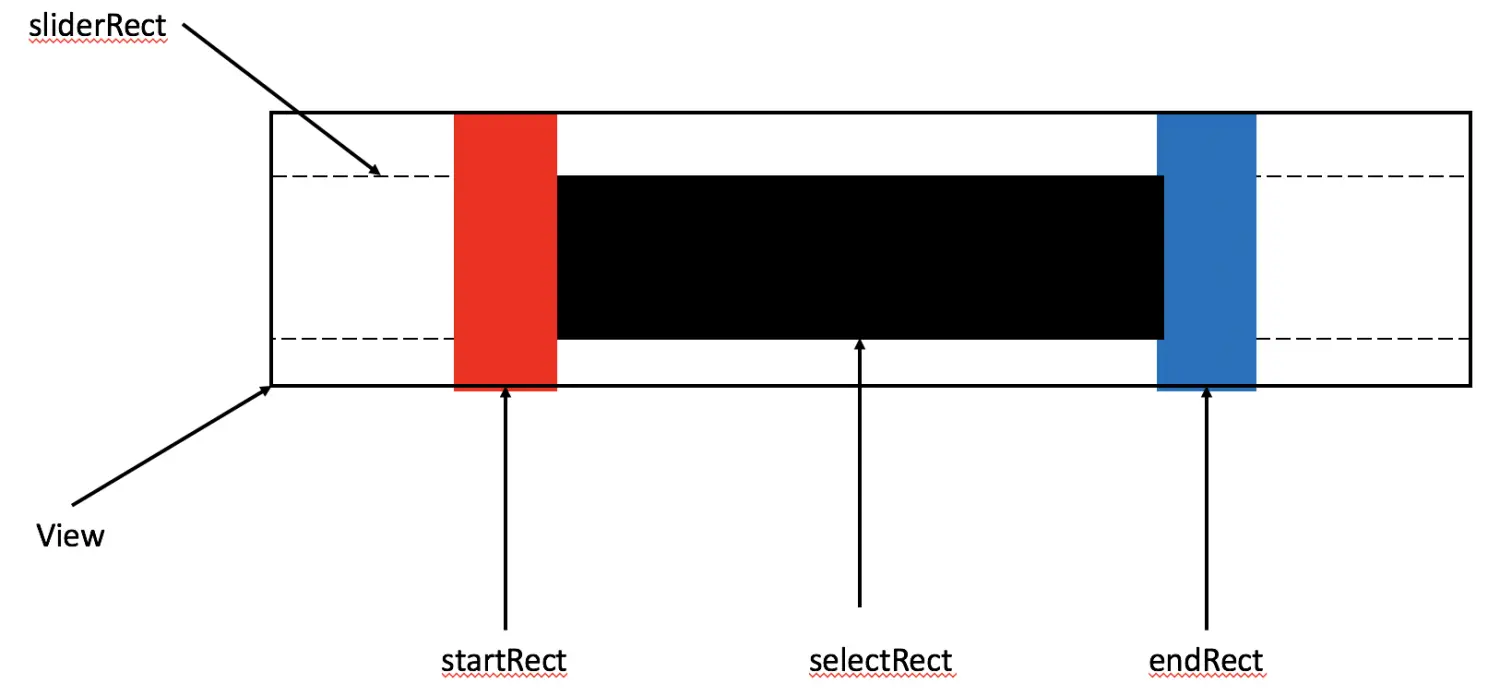
View:整个双向滑块控件。
sliderRect:白条,未被选中的区域。
selectRect:黑条,被选中的区域。
startRect:红条,左滑块。
endRect:蓝条,右滑块。
Part II 双向滑块的初始化及绘制
1、四个区域的初始化
1
2
3
4
5
6
7
8
9
10
11
12
13
14
15
16
17
18
19
20
21
| barWidth = NSWidth(self.bounds)*0.03;
sliderRect = NSMakeRect(barWidth,
NSHeight(self.bounds)/4,
NSWidth(self.bounds)-barWidth*2,
NSHeight(self.bounds)/2);
startRect = NSMakeRect(NSMinX(self.bounds),
NSMinY(self.bounds),
barWidth,
NSHeight(self.bounds));
endRect = NSMakeRect(NSMaxX(self.bounds)-barWidth,
NSMinY(self.bounds),
barWidth,
NSHeight(self.bounds));
selectRect = NSMakeRect(barWidth,
NSHeight(self.bounds)/4,
(NSWidth(self.bounds)-barWidth),
NSHeight(self.bounds)/2);
|
2、四个区域的绘制
对绘制NSRect区域的代码做一层封装,其方法定义如下:
1
2
3
4
5
| -(void)drawRectBound:(NSRect)bound color:(NSColor*)color{
NSBezierPath *path = [NSBezierPath bezierPathWithRect:bound];
[color setFill];
[path fill];
}
|
因此,在drawRect方法中调用此方法即可,代码如下:
1
2
3
4
| [self drawRectBound:sliderRect color:[NSColor whiteColor]];
[self drawRectBound:selectRect color:[NSColor blackColor]];
[self drawRectBound:startRect color:[NSColor redColor]];
[self drawRectBound:endRect color:[NSColor blueColor]];
|
Part III 实现左右滑块的移动
在实现滑块的移动时,需要使用以下四个方法:
1
2
3
4
5
6
7
8
9
10
11
12
13
14
15
16
17
18
19
20
21
22
23
24
25
26
27
28
29
30
31
32
33
34
35
36
| //返回YES的话,View会接收mouseDown消息。
-(BOOL)acceptsFirstMouse:(NSEvent *)event{
return YES;
}
//鼠标按下时,执行此方法。
-(void)mouseDown:(NSEvent *)event{
NSPoint clickedLocationPoint = [event locationInWindow];
NSPoint localPoint = [self convertPoint:clickedLocationPoint fromView:nil];
if(NSPointInRect(localPoint, startRect)){
//左滑块被点击
startChange = YES;
}else if(NSPointInRect(localPoint, endRect)){
//右滑块被点击
endChange = YES;
}
}
//鼠标松开时,执行此方法。
-(void)mouseUp:(NSEvent *)event{
startChange = NO;
endChange = NO;
}
//鼠标拖拽时执行此方法。
-(void)mouseDragged:(NSEvent *)event{
NSPoint clickLocationPoint = [event locationInWindow];
NSPoint localPoint = [self convertPoint:clickLocationPoint fromView:nil];
if(startChange){
[self leftBarChange:localPoint];
}else if(endChange){
[self rightBarChange:localPoint];
}
}
|
在leftBarChange和rightBarChange方法中,我们需要通过坐标的计算重新绘制双向滑块的四个区域,代码如下:
1
2
3
4
5
6
7
8
9
10
11
12
13
14
15
16
17
18
19
20
21
22
23
24
25
26
27
28
29
30
31
32
33
34
35
36
37
38
39
40
41
42
43
44
45
46
47
48
49
50
51
52
53
54
55
56
57
58
| -(void)leftBarChange:(NSPoint)localPoint{
NSRect origin = startRect;
if(localPoint.x-barWidth < NSMinX(self.bounds)){
//超出最小值
startRect = NSMakeRect(0,
NSMinY(origin),
NSWidth(origin),
NSHeight(origin));
}else if(localPoint.x > NSMinX(endRect)){
//超出最大值
startRect = NSMakeRect(NSMinX(endRect)-barWidth,
NSMinY(origin),
NSWidth(origin),
NSHeight(origin));
}else{
//正常值
startRect = NSMakeRect(localPoint.x-barWidth,
NSMinY(origin),
NSWidth(origin),
NSHeight(origin));
}
selectRect = NSMakeRect(NSMaxX(startRect),
NSHeight(self.bounds)/4,
NSMinX(endRect)-NSMaxX(startRect),
NSHeight(self.bounds)/2);
[self setNeedsDisplay:YES];
}
-(void)rightBarChange:(NSPoint)localPoint{
NSRect origin = endRect;
if(localPoint.x < NSMaxX(startRect)){
//超出最小值
endRect = NSMakeRect(NSMaxX(startRect),
NSMinY(origin),
NSWidth(origin),
NSHeight(origin));
}else if(localPoint.x+barWidth > NSMaxX(self.bounds)){
//超出最大值
endRect = NSMakeRect(NSMaxX(self.bounds)-barWidth,
NSMinY(self.bounds),
barWidth,
NSHeight(self.bounds));
}else{
//正常值
endRect = NSMakeRect(localPoint.x,
NSMinY(origin),
NSWidth(origin),
NSHeight(origin));
}
selectRect = NSMakeRect(NSMaxX(startRect),
NSHeight(self.bounds)/4,
NSMinX(endRect)-NSMaxX(startRect),
NSHeight(self.bounds)/2);
[self setNeedsDisplay:YES];
}
|
Part IV 计算左右滑块的选中范围值
当左右滑块的位置发生变化时,需要计算左右滑块当前位置的值,其公式如下:
1
2
3
4
5
6
7
| //计算左滑块起始值
double startScale = (NSMaxX(startRect)-NSMinX(sliderRect))/NSWidth(sliderRect);
_start = startScale*(self.maxValue-self.minValue)+self.minValue;
//计算右滑块结束值
double endScale = (NSMinX(endRect)-NSMinX(sliderRect))/NSWidth(sliderRect);
_end = endScale*(self.maxValue-self.minValue)+self.minValue;
|
当设定起始值与结束值时,计算左右滑块位置,即set方法,代码如下:
1
2
3
4
5
6
7
8
9
10
11
12
13
14
15
16
17
18
19
| -(void)setStart:(double)start{
double startScale = (start-self.minValue)/(self.maxValue-self.minValue);
NSPoint tmpPoint = NSMakePoint(startScale*NSWidth(sliderRect) + NSMinX(sliderRect),0);
_start = start;
[self leftBarChange:tmpPoint];
}
-(void)setEnd:(double)end{
double endScale = (end-self.minValue)/(self.maxValue-self.minValue);
NSPoint tmpPoint = NSMakePoint(endScale*NSWidth(sliderRect)+NSMinX(sliderRect),0);
_end = end;
[self rightBarChange:tmpPoint];
}
|
Part V 声明、实现委托
代理协议声明如下:
1
2
3
4
| @protocol MySliderDelegate<NSObject>
- (void) leftBarChanged:(MySlider *)slider;
- (void) rightBarChanged:(MySlider *)slider;
@end
|
实现的核心代码如下:
1
2
3
4
5
6
7
8
9
10
11
12
| //左滑块改变
if(self.delegate != NULL){
if([self.delegate respondsToSelector:@selector(leftBarChanged:)]){
[self.delegate leftBarChanged:self];
}
}
//右滑块改变
if(self.delegate != NULL){
if([self.delegate respondsToSelector:@selector(rightBarChanged:)]){
[self.delegate rightBarChanged:self];
}
}
|